LumiViewer Mobile App/How to Liveview in LumiViewer: Difference between revisions
From Luminys WIKI
Techsupport (talk | contribs) Created page with "<div class="lm-banner">File:LuminysMainPageBanner2.png</div> = <div class="center">How to Liveview in LumiViewer</div> = ===Description=== This tutorial will go over how to liveview in LumiViewer. ===Prerequisites=== * Devices already added to LumiViewer. ===Video Instructions=== <!--<embedvideo service="youtube">Coming soon</embedvideo>--> Coming soon ===Step by Step Instructions=== 1. On the "Home" page, select the device name, which is r52 in this case. F..." |
(No difference)
|
Revision as of 09:00, 16 December 2024

How to Liveview in LumiViewer
Description
This tutorial will go over how to liveview in LumiViewer.
Prerequisites
- Devices already added to LumiViewer.
Video Instructions
Coming soon
Step by Step Instructions
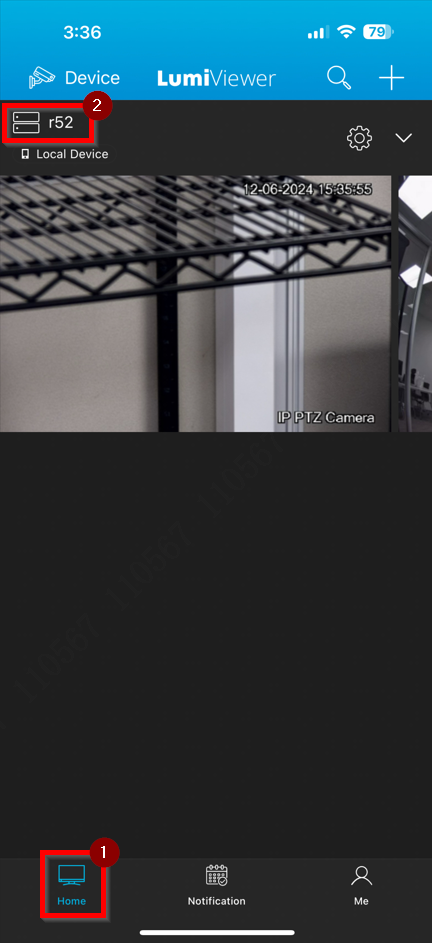
1. On the "Home" page, select the device name, which is r52 in this case.
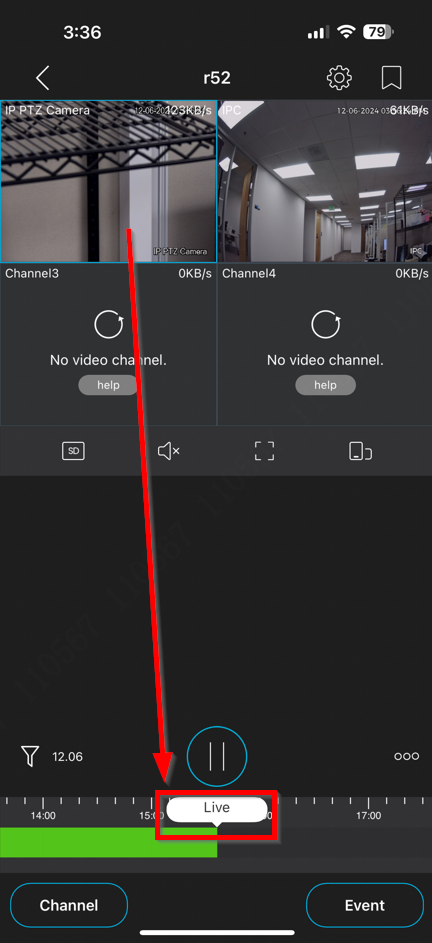
2. A 4-grid live view will be displayed, with the top-left camera selected by default. The term "Live" appears below the timeline, indicating that the live image is being viewed in real time.