Cameras/LPR Physical Installation Guide: Difference between revisions
Techsupport (talk | contribs) Created page with "= <div class="center">Physical Installation Guide</div> = ===Description=== This tutorial will go over some information about physical installation for LPR cameras. ===Prerequisites=== * LPR camera ===Video Instructions=== <!-- <youtube>https://www.youtube.com/watch?v=IQCQncIXNGM&ab_channel=LuminysSystemsCorporation</youtube> -->Coming Soon ===Step by Step Instructions=== ====Installation Limitations==== The angle between camera lens and the edge of the farthest la..." |
Techsupport (talk | contribs) No edit summary |
||
| Line 36: | Line 36: | ||
Ensure the vehicle has made a complete turn and is moving straight to capture a license plate. | Ensure the vehicle has made a complete turn and is moving straight to capture a license plate. | ||
[[File:Physical_Installation_LPR_4. | [[File:Physical_Installation_LPR_4.png|1000px|link=https://wiki.luminyscorp.com/images/1/14/Physical_Installation_LPR_4.png]] | ||
====License Plate Angle==== | ====License Plate Angle==== | ||
| Line 54: | Line 54: | ||
Below are common issues if the license plate camera is not installed properly. | Below are common issues if the license plate camera is not installed properly. | ||
<span style=color: | <span style=color:black;font-weight:bold>Clarity Issues</span> | ||
If the license plate is not in focus or blurry, the focal length or shutter speed may need to be adjusted. | If the license plate is not in focus or blurry, the focal length or shutter speed may need to be adjusted. | ||
| Line 60: | Line 60: | ||
[[File:Physical_Installation_LPR_7.png|1000px|link=https://wiki.luminyscorp.com/images/8/81/Physical_Installation_LPR_7.png]] | [[File:Physical_Installation_LPR_7.png|1000px|link=https://wiki.luminyscorp.com/images/8/81/Physical_Installation_LPR_7.png]] | ||
<span style=color: | <span style=color:black;font-weight:bold>Angle Issues</span> | ||
If the license plate is not in focus or blurry, the focal length or shutter speed may need to be adjusted. | If the license plate is not in focus or blurry, the focal length or shutter speed may need to be adjusted. | ||
| Line 66: | Line 66: | ||
[[File:Physical_Installation_LPR_8.png|1000px|link=https://wiki.luminyscorp.com/images/d/de/Physical_Installation_LPR_8.png]] | [[File:Physical_Installation_LPR_8.png|1000px|link=https://wiki.luminyscorp.com/images/d/de/Physical_Installation_LPR_8.png]] | ||
<span style=color: | <span style=color:black;font-weight:bold>Overexposure</span> | ||
If the license plate is overexposed, the shutter speed or IR light brightness may need to be adjusted. | If the license plate is overexposed, the shutter speed or IR light brightness may need to be adjusted. | ||
| Line 72: | Line 72: | ||
[[File:Physical_Installation_LPR_9.png|1000px|link=https://wiki.luminyscorp.com/images/4/4e/Physical_Installation_LPR_9.png]] | [[File:Physical_Installation_LPR_9.png|1000px|link=https://wiki.luminyscorp.com/images/4/4e/Physical_Installation_LPR_9.png]] | ||
<span style=color: | <span style=color:black;font-weight:bold>Insufficient Lighting</span> | ||
If the license plate characters are too small or too large to be captured, the focal length or distance between the camera and vehicle may need to be adjusted. | If the license plate characters are too small or too large to be captured, the focal length or distance between the camera and vehicle may need to be adjusted. | ||
| Line 78: | Line 78: | ||
[[File:Physical_Installation_LPR_10.png|1000px|link=https://wiki.luminyscorp.com/images/6/60/Physical_Installation_LPR_10.png]] | [[File:Physical_Installation_LPR_10.png|1000px|link=https://wiki.luminyscorp.com/images/6/60/Physical_Installation_LPR_10.png]] | ||
<span style=color: | <span style=color:black;font-weight:bold>License Plate Character Too Small or Too Large</span> | ||
If the license plate characters are too small or too large to be captured, the focal length or distance between the camera and vehicle may need to be adjusted. | If the license plate characters are too small or too large to be captured, the focal length or distance between the camera and vehicle may need to be adjusted. | ||
[[File:Physical_Installation_LPR_11.png|1000px|link=https://wiki.luminyscorp.com/images/e/e2/Physical_Installation_LPR_11.png]] | [[File:Physical_Installation_LPR_11.png|1000px|link=https://wiki.luminyscorp.com/images/e/e2/Physical_Installation_LPR_11.png]] | ||
Revision as of 10:44, 17 June 2025
Physical Installation Guide
Description
This tutorial will go over some information about physical installation for LPR cameras.
Prerequisites
- LPR camera
Video Instructions
Coming Soon
Step by Step Instructions
Installation Limitations
The angle between camera lens and the edge of the farthest lane cannot exceed 30° regardless if the camera is installed frontally or on the side. The camera will capture a snapshot up to 1.7 times the height between the placement of the camera and the edge of the farthest lane.
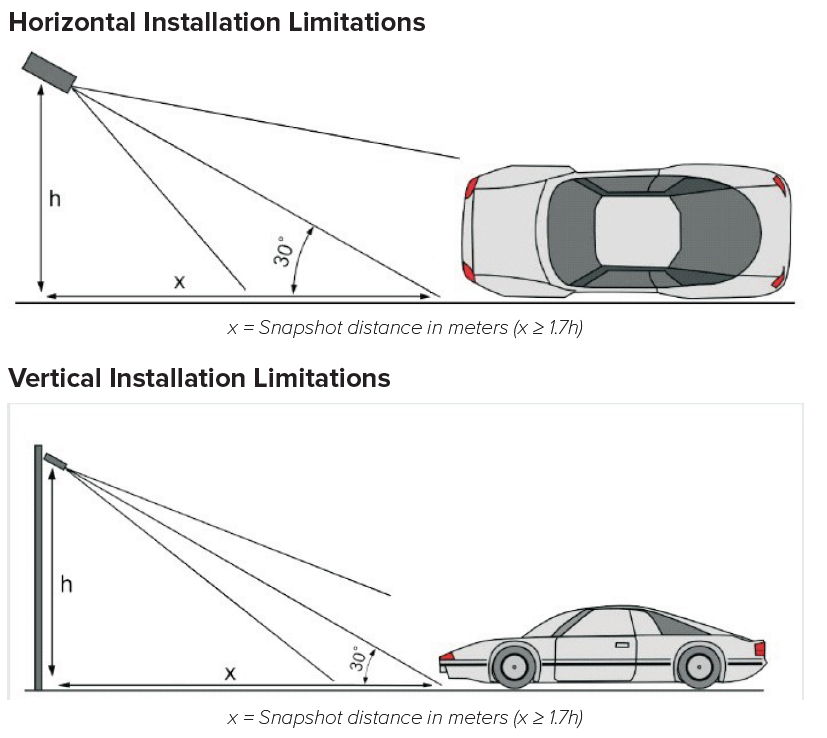
Installation Applications
The following table gives the recommended measurements for optimal performance of the camera.

Front or Side Installation
Install the camera at the center of the lane. The camera can be installed below 3.0 m (9.8 ft). Only one lane can be monitored.
Vehicle Entrance Installation
For the best results, it is recommended to install the camera at a height of 1.2 m (3.9 ft). The lane width should not exceed 3.5 m (11.5 ft). If the lane is too wide, place guides on the lane to direct vehicle traffic. The camera will capture a snapshot from 4.0 m (13.1 ft) away.
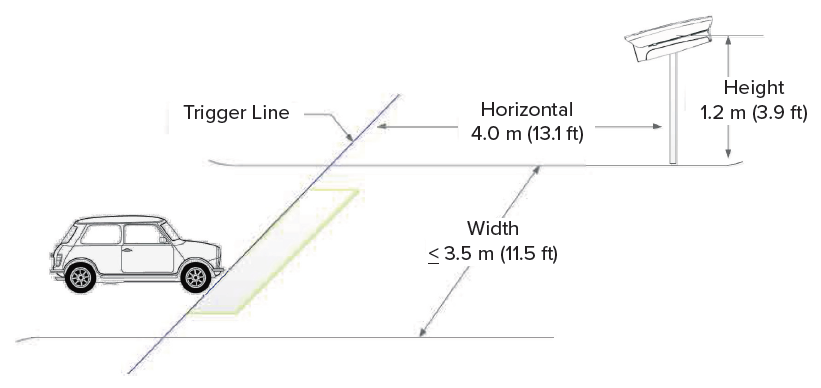
Ensure the vehicle has made a complete turn and is moving straight to capture a license plate.
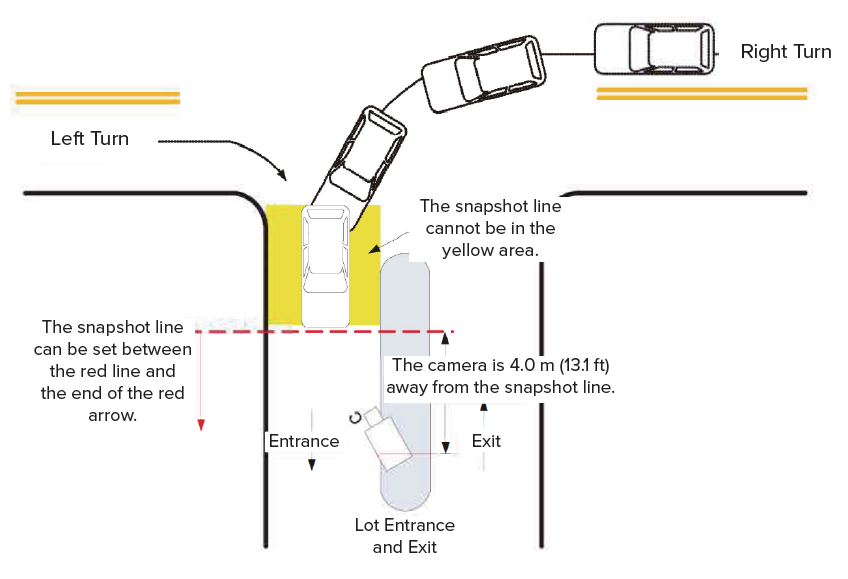
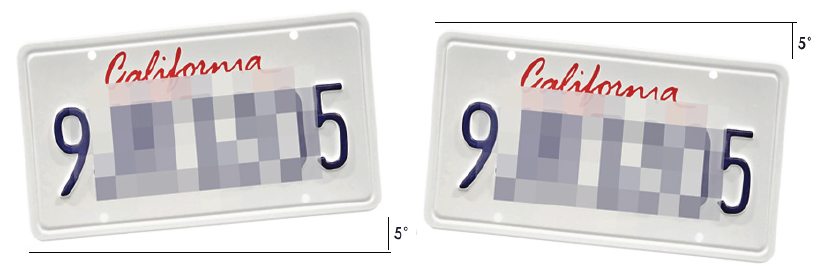
License Plate Angle
The camera can capture license plates with up to a 5° tilt as shown below.
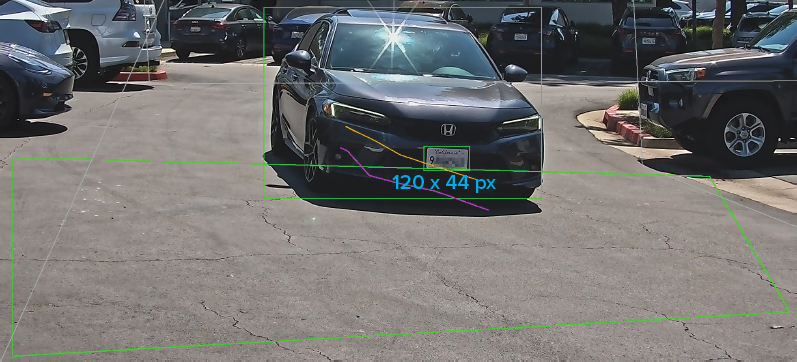
License Plate Height
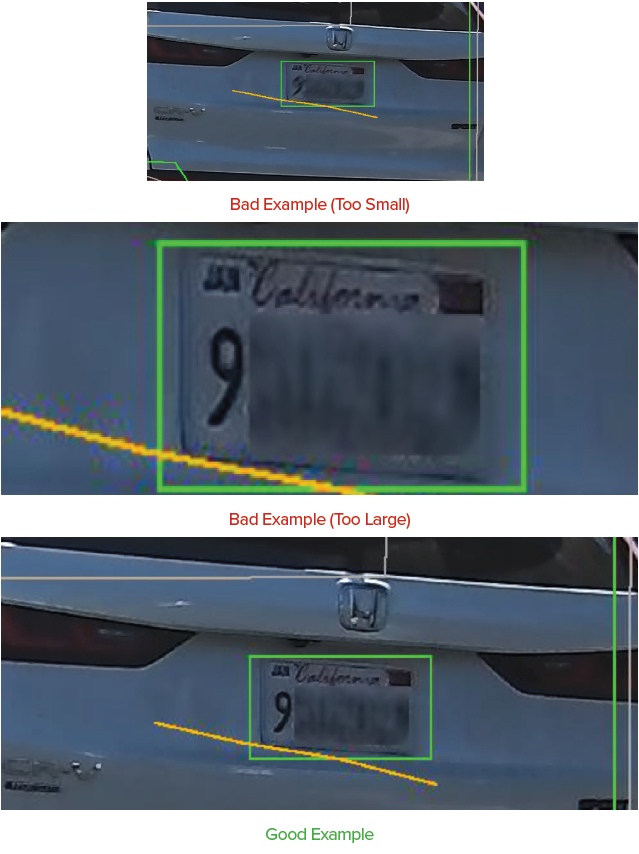
The camera can read characters with a height between 20 to 50 px.
Troubleshooting
Below are common issues if the license plate camera is not installed properly.
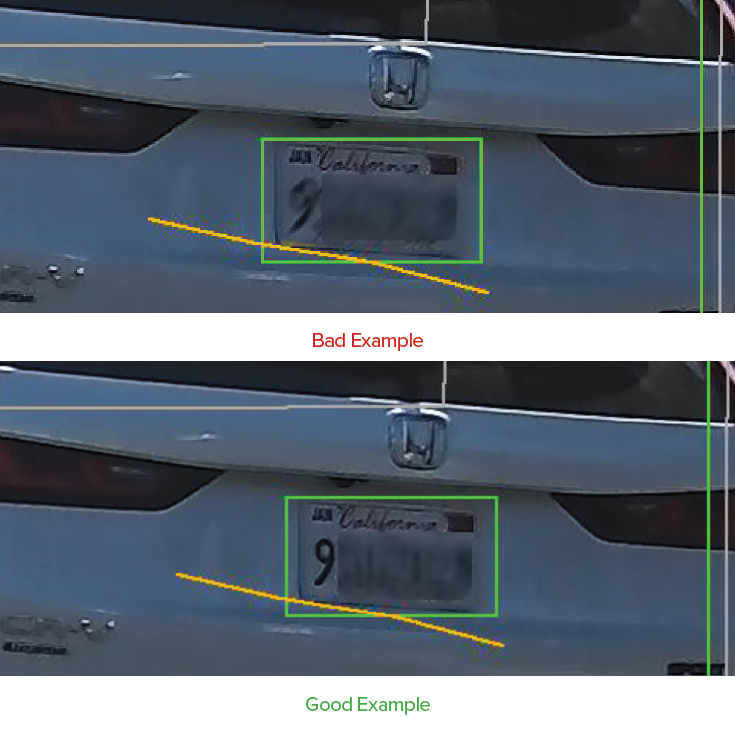
Clarity Issues
If the license plate is not in focus or blurry, the focal length or shutter speed may need to be adjusted.
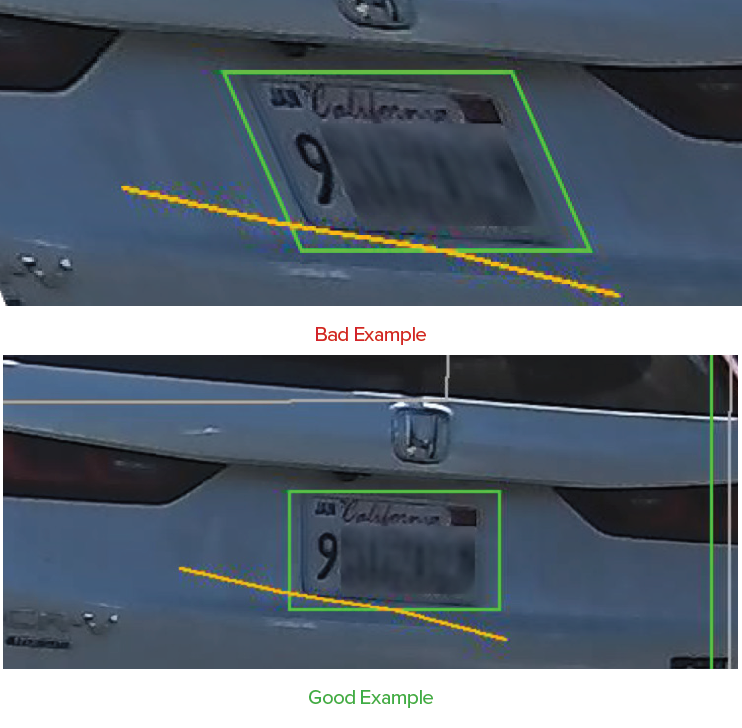
Angle Issues
If the license plate is not in focus or blurry, the focal length or shutter speed may need to be adjusted.
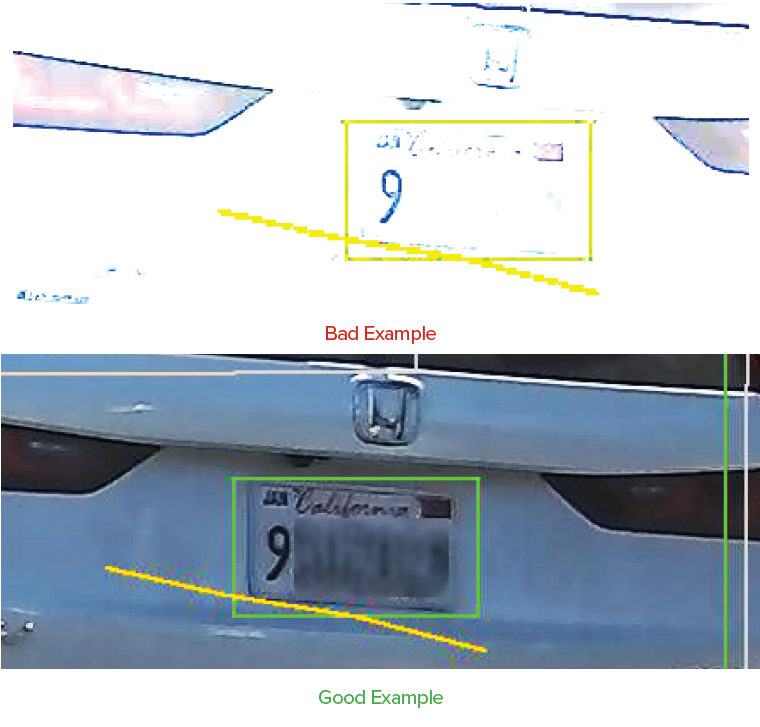
Overexposure
If the license plate is overexposed, the shutter speed or IR light brightness may need to be adjusted.
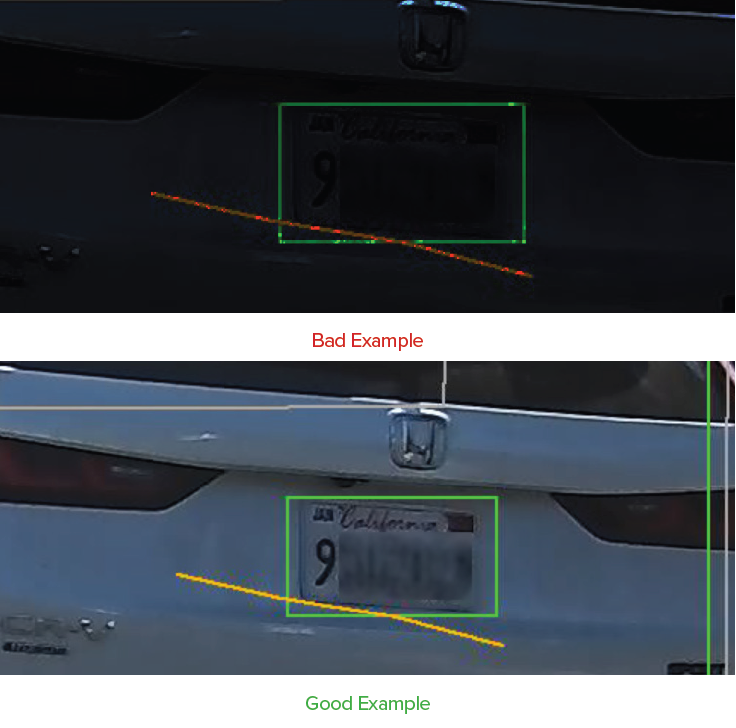
Insufficient Lighting
If the license plate characters are too small or too large to be captured, the focal length or distance between the camera and vehicle may need to be adjusted.
License Plate Character Too Small or Too Large
If the license plate characters are too small or too large to be captured, the focal length or distance between the camera and vehicle may need to be adjusted.