Access Control/Wiring of the Reader and Controller: Difference between revisions
From Luminys WIKI
Techsupport (talk | contribs) Created page with "test" |
Techsupport (talk | contribs) |
||
| (3 intermediate revisions by the same user not shown) | |||
| Line 1: | Line 1: | ||
<div class="lm-banner">[[File:LuminysMainPageBanner2.png]]</div> | |||
= <div class="center">Wiring of the Reader and Controller</div> = | |||
===Description=== | |||
This tutorial will go over how to wire reader to access control. | |||
===Prerequisites=== | |||
* Access control and readers | |||
===Video Instructions=== | |||
<youtube>https://youtu.be/CBNlO8BeUV0</youtube> | |||
===Step by Step Instructions=== | |||
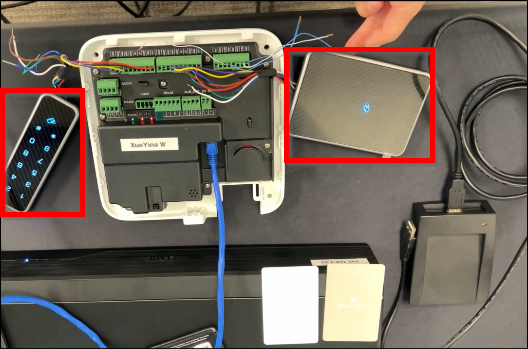
1. In the following wiring example, two readers are connected via RS485 to access control. | |||
[[File:Access_Control_Wiring_1.png|1000px|link=https://wiki.luminyscorp.com/images/b/b2/Access_Control_Wiring_1.png]] | |||
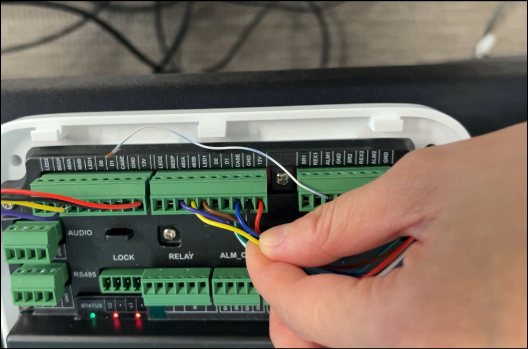
2. Match the wires of the reader and connect them to the corresponding contacts of the access control.<br> | |||
<span style=color:purple;font-style:italic;font-weight:bold>Purple </span> = 485A<br> | |||
<span style=color:black;font-style:italic;font-weight:bold>Yellow</span> = 485B<br> | |||
<span style=color:brown;font-style:italic;font-weight:bold>Brown</span> = LED1<br> | |||
<span style=color:blue;font-style:italic;font-weight:bold>Blue</span> = CASE<br> | |||
<span style=color:black;font-style:italic;font-weight:bold>Black</span> = GND<br> | |||
<span style=color:red;font-style:italic;font-weight:bold>Red</span> = 12V | |||
[[File:Access_Control_Wiring_2.png|1000px|link=https://wiki.luminyscorp.com/images/b/b6/Access_Control_Wiring_2.png]] | |||
<span style=color:black;font-style:italic;font-weight:bold>Note: For third-party readers, Wiegand connections are supported.</span> | |||
Latest revision as of 15:53, 19 June 2025

Wiring of the Reader and Controller
Description
This tutorial will go over how to wire reader to access control.
Prerequisites
- Access control and readers
Video Instructions
Step by Step Instructions
1. In the following wiring example, two readers are connected via RS485 to access control.
2. Match the wires of the reader and connect them to the corresponding contacts of the access control.
Purple = 485A
Yellow = 485B
Brown = LED1
Blue = CASE
Black = GND
Red = 12V
Note: For third-party readers, Wiegand connections are supported.

