Chapter 1: Installation and Activation
- Wiring of the Reader and Controller
- Initialization
- Device and User Management
- Time Plan and Permission Settings
- Door Parameter Settings
- Bluetooth Functions
- Advanced Functions
- Other Functions
No edit summary |
No edit summary |
||
| Line 15: | Line 15: | ||
C-2PA= | C-2PA= | ||
=====Chapter 1: Installation and Activation===== | |||
*[[Access_Control/Wiring_of_the_Reader_and_Controller | Wiring of the Reader and Controller]] | *[[Access_Control/Wiring_of_the_Reader_and_Controller | Wiring of the Reader and Controller]] | ||
*[[Access_Control/Initialization | Initialization]] | *[[Access_Control/Initialization | Initialization]] | ||
| Line 21: | Line 22: | ||
*[[test10 | Door Parameter Settings]] | *[[test10 | Door Parameter Settings]] | ||
*[[test10 | Bluetooth Functions]] | *[[test10 | Bluetooth Functions]] | ||
*[[test10 | Advanced Functions]] | |||
*[[test10 | Other Functions]] | |||
=====WebUI Configuration (Stand Alone)===== | |||
*[[Access_Control/USB Card Issuer - WebUI| Using a USB Card Issuer via WebUI]] | |||
*[[Access_Control/PIN Unlocking - WebUI| Setting Up PIN Unlocking via WebUI]] | |||
=====LumiViewer Configuration===== | |||
*[[Access_Control/USB Card Issuer - LumiViewer | Using a USB Card Issuer via LumiViewer]] | *[[Access_Control/USB Card Issuer - LumiViewer | Using a USB Card Issuer via LumiViewer]] | ||
*[[Access_Control/PIN Unlocking - LumiViewer | Setting Up PIN Unlocking via LumiViewer]] | *[[Access_Control/PIN Unlocking - LumiViewer | Setting Up PIN Unlocking via LumiViewer]] | ||
|-| | |-| | ||

| Models | Description |
|---|---|
|
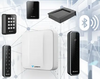
Luminys Access Control: Secure, Scalable, and Smart Solutions for Modern Facilities. Manage up to 30 doors with the powerful C-2PA Web Access Controller and advanced card readers. Luminys access solutions provide centralized control, real-time monitoring, and flexible credentialing to fit any security environment. |
Coming soon

