LumiWatch/LumiWatch router first time configuration: Difference between revisions
From Luminys WIKI
Techsupport (talk | contribs) |
Techsupport (talk | contribs) |
||
| Line 13: | Line 13: | ||
===Step by Step Instructions=== | ===Step by Step Instructions=== | ||
1. Open a web browser and navigate to https://iot.inhandnetworks.com/user/register, or click the link to open it directly. | 1. Open a web browser and navigate to https://iot.inhandnetworks.com/user/register, or click the link to open it directly. | ||
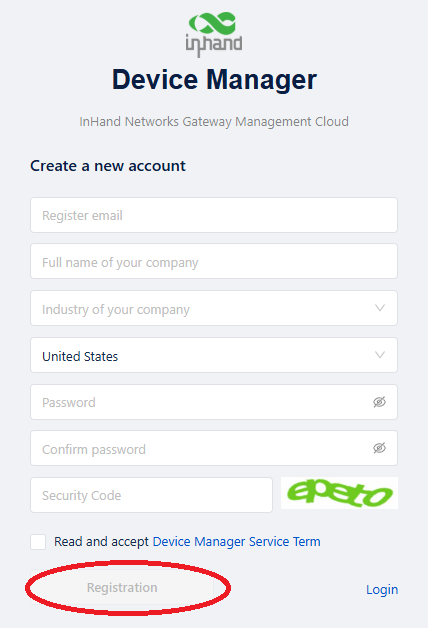
2. Fill out the information on the page, then click "Registration" | |||
[[File:LumiWatch_router_first_time_config_2.png|512px|link=https://wiki.luminyscorp.com/images/5/5e/LumiWatch_router_first_time_config_2.png]] | |||
Revision as of 15:17, 4 August 2026

LumiWatch router first time configuration
Description
This tutorial will walk you through the process of configuring the LumiWatch router for the first time.
Prerequisite
1. LumiWatch powered on and running.
2. 4G SIM card with an active data plan installed.
3. Computer network segment configured to 192.168.1.x
Step by Step Instructions
1. Open a web browser and navigate to https://iot.inhandnetworks.com/user/register, or click the link to open it directly.
2. Fill out the information on the page, then click "Registration"