IP Speaker/Add to LumiCenter via External IP
Description
This is used in LumiCenter to remotely add an IP speaker and enable audio playback and two-way communication.
Prerequisites
- The IP speaker must be on a network with a static public IP address.
- The IP speaker firmware must be version V1.43.1(260522B) or later.
Step by Step Instructions
Initial IP Speaker Setup
1. Parameters setting for IP speaker:
After logging in, go to Interface Protocol > ONVIF tab > Click on "Enable" button. Configure the Username, Password, ONVIF Port, RTSP Port, RTP Port, NAT IP Address, and NAT ONVIF Port as shown in the images below:
Tip: Use 554 as the RTSP port.
Set the RTP port range to 8000–8005 and use UDP for port forwarding.
The NAT IP Address is the network’s static public IP address.
The NAT ONVIF Port is the public ONVIF port used for adding the device.
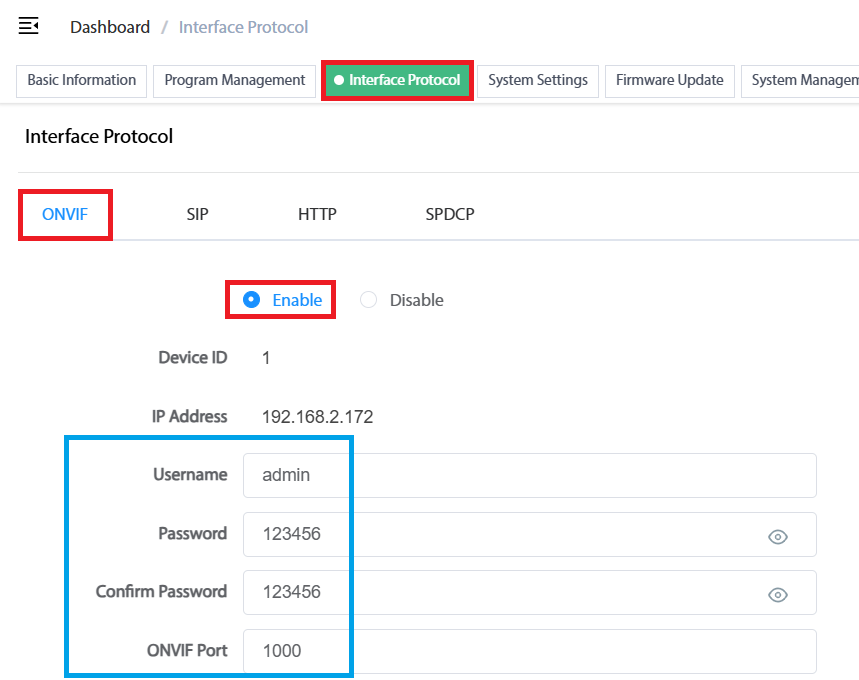
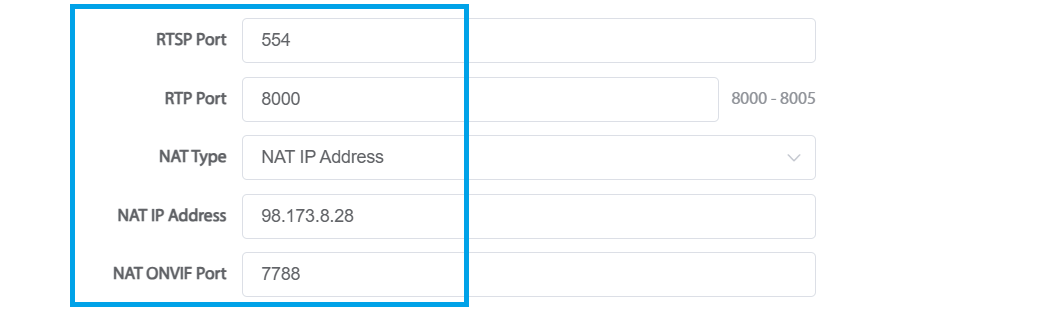
2.Perform port forwarding in advance. The following is an example of the configuration: Tip: HTTP port forwarding is optional if remote web access is not required. <\span>

