Access Control/Initialization C-4MA: Difference between revisions
From Luminys WIKI
Techsupport (talk | contribs) Created page with "{{Header}} <div class="lm-banner">File:LuminysMainPageBanner2.png</div> = <div class="center">Access Control Initialization and Basic Setup</div> = ===Description=== This tutorial will go over how to initialize access control and some basic setup. ===Prerequisites=== * Access control powered and connected on local network. ===Step by Step Instructions===" |
Techsupport (talk | contribs) No edit summary |
||
| Line 9: | Line 9: | ||
===Prerequisites=== | ===Prerequisites=== | ||
* Access control powered and connected on local network. | * Access control powered and connected on local network. | ||
* LumiUtility Installed | |||
===Step by Step Instructions=== | ===Step by Step Instructions=== | ||
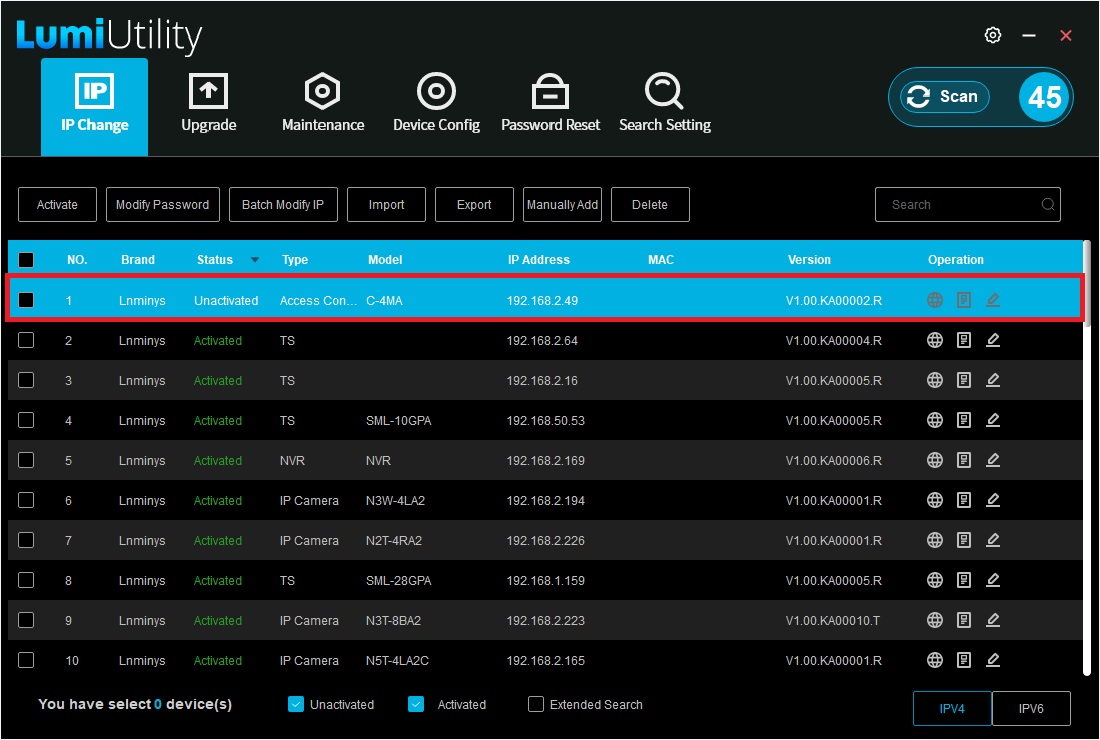
1. Open LumiUtility and locate the local IP address of the access controller. In the example below, the IP address is 192.168.2.49. | |||
[[File:C-4MA_WebUI_Initialization_1.png|1024px|link=https://wiki.luminyscorp.com/images/c/c4/C-4MA_WebUI_Initialization_1.png]] | |||
Revision as of 14:42, 19 August 2026
☰ Navigation Menu ▾


Access Control Initialization and Basic Setup
Description
This tutorial will go over how to initialize access control and some basic setup.
Prerequisites
- Access control powered and connected on local network.
- LumiUtility Installed
Step by Step Instructions
1. Open LumiUtility and locate the local IP address of the access controller. In the example below, the IP address is 192.168.2.49.