LumiWatch/LumiWatch LumiViewer Setup
From Luminys WIKI
Revision as of 17:08, 2 September 2026 by Techsupport (talk | contribs) (→Step by Step Instructions)
☰ Navigation Menu ▾
-
How-To Guides ▾
- Cameras ▸
- Recorders ▸
- IP Speaker
- Access Control ▸
- LumiCloud ▸
- Networking ▸
- Off Grid ▸
-
Software & Apps▸
- Computer Software ▸
- Mobile Software ▸
- 3rd Party Integration
-
How-To Videos ▾
- Cameras ▸
- Recorders ▸
- Access Control
- Off Grid ▸
- LumiCloud ▸
- Software ▸
-
Firmware & Data Sheets ▾
- Cameras ▸
- Recorders ▸
- Kits
- IP Speaker
- Access Control
- Networking
- Off-Grid ▸
-
Software Downloads ▾
- Computer Software ▸
- Mobile Software ▸
- Product Selector ▾

Contents
How to Set Up LumiWatch via LumiViewer
Description
This tutorial will go over how to set up LumiWatch via LumiViewer.
Prerequisites
- P54-4DB25, N5P-8DA2, N5T-8DAV
- LumiViewer installed on PC
Step by Step Instructions
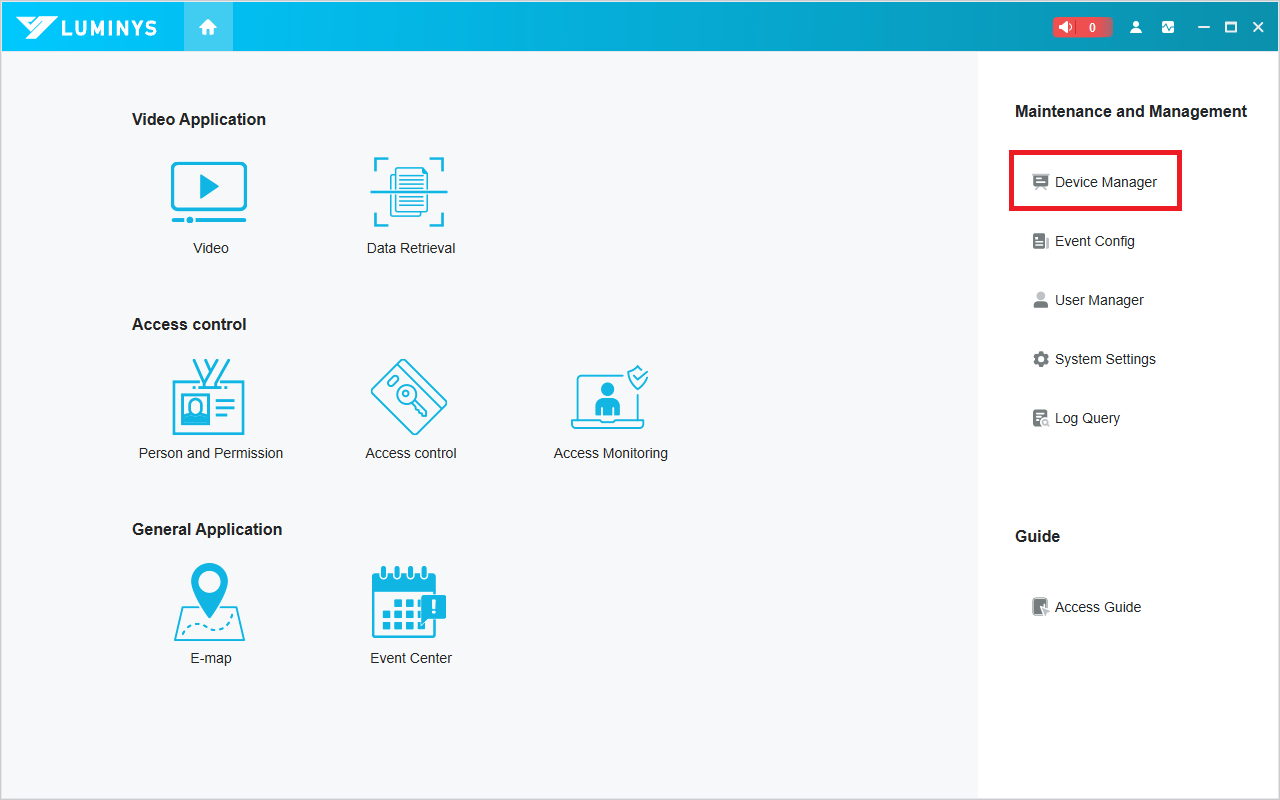
1. Open LumiViewer on your PC, then click "Device Manager"