|
|
| (46 intermediate revisions by the same user not shown) |
| Line 1: |
Line 1: |
| <div class="lm-banner">[[File:LuminysMainPageBanner2.png]]</div>
| |
|
| |
| = <div class="center">Camera Instructions</div> = | | = <div class="center">Camera Instructions</div> = |
|
| |
|
| <tabber> | | <tabber> |
| Camera Setup=
| | IPC= |
| | </br> |
| | {|class="wikitable" style="width:90%; margin:auto;" |
| | !|Models |
| | !|Description |
| | |- |
| | |[[File:Network_Cameras_Sample.png|100px|link=]] |
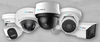
| | | style="text-align:left;"|Luminys provides a comprehensive selection of network security cameras. With advanced video analytics and innovative lighting technologies, including LumiLightBand, LumiDeterrent, LumiColor, and LumiLuxSmart, operators can respond quickly and proactively to potential incidents. |
| | |} |
| | |
| =====Initial Setup===== | | =====Initial Setup===== |
| *[[IPC/Initializing_Cameras| How to Initialize Cameras]] | | *[[IPC/Initializing_Cameras| How to Initialize Cameras]] |
| *[[IPC/IP_Camera_TCP/IP_Network_Settings | IP Camera TCP/IP Network Settings]]<br> | | *[[IPC/IP_Camera_TCP/IP_Network_Settings | IP Camera TCP/IP Network Settings]]<br> |
| | *[[NVR/RTSP_URL_Formatting | RTSP URL Formatting]]</br> |
| | *[[NVR/Port Forwarding | Port Forwarding Luminys Devices]] |
| | |
| =====Password Reset===== | | =====Password Reset===== |
| *[[IPC/IP_Camera_Password_Reset | IP Camera Password Reset]]<br> | | *[[IPC/IP_Camera_Password_Reset | IP Camera Password Reset]]<br> |
| | |
| =====iMD===== | | =====iMD===== |
| | *[[IPC/Intelligent_Motion_Detection_(IMD)_Setup_on_IP_Cameras | Intelligent Motion Detection (IMD) Setup on IP Cameras]]<br> |
| | |
| | =====LumiCloud===== |
| | *[[LumiCloud/Set Up VCA | Set Up VCA for Cameras via LumiCloud]] |
| | |
| =====LumiLuxSmart===== | | =====LumiLuxSmart===== |
| | *[[IPC/LumiLuxSmart Setup on IPC | LumiLuxSmart Setup on IPC]]<br> |
| | |
| =====LumiDeterrent===== | | =====LumiDeterrent===== |
| =====LumiSearch=====
| | *[[IPC/LumiDeterrent Setup on IP Camera | LumiDeterrent Setup on IP Camera]]<br> |
| | |
| =====LumiAnalytics===== | | =====LumiAnalytics===== |
| =====LumiPower===== | | *[[IPC/Video Content Analytics (VCA) Setup on IP Camera | Video Content Analytics (VCA) Setup on IP Camera]]<br> |
| | |
| | =====LumiLuxLite===== |
| | *[[IPC/LumiLuxLite_Kit_IP_Camera_Firmware_Upgrade | LumiLuxLite Kit IP Camera Firmware Upgrade]] |
| | |
| | =====LumiFlex===== |
| | *[[IPC/Enable and Use LumiFlex | How to Enable and Use LumiFlex]] |
| | |
| | |-| |
| | |
| | Fisheye= |
| | </br> |
| | {|class="wikitable" style="width:90%; margin:auto;" |
| | !|Models |
| | !|Description |
| | |- |
| | |[[File:Fisheye.png|100px|link=]] |
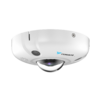
| | |! style="text-align:left;"|Luminys Fisheye are specialty security cameras, and they offer high-resolution 360° or 180° panoramic surveillance in a compact design. |
| | |} |
| | |
| | =====Dewarping===== |
| | *[[Cameras/Dewarping_Mode_via_WebGUI | How to Dewarp Fisheye Cameras in WebGUI]] |
| | *[[Cameras/Fisheye Record Mode | Change Fisheye Camera Record Mode via WebUI]] |
| | |
| | |-| |
| | |
| | PTZ= |
| | </br> |
| | {|class="wikitable" style="width:90%; margin:auto;" |
| | !|Models |
| | !|Description |
| | |- |
| | |[[File:PTZ-left.png|100px]] |
| | |! style="text-align:left;"|Luminys PTZ cameras utilize LumiTracking technology to track people or vehicles in real time throughout a scene. |
| | |} |
| | |
| | ====WebGUI==== |
| | *[[Cameras/Setting_Up_PTZ_Presets | PTZ Presets Setup]] |
| | *[[Cameras/Tour_Setup | PTZ Tour Setup]] |
| | *[[Cameras/IP_PTZ_LumiTracking_Setup | PTZ LumiTracking Setup]] |
| | *[[Cameras/180 Camera Linkage | Setting Up PTZ 180° Camera Linkage (For P54-4DA25 and Similar Models)]] |
| | |
| | ====LumiCloud==== |
| | *[[LumiCloud/Set_Up_VCA_for_PTZs|Setup VCA for PTZs in LumiCloud]] |
| | |
| | |-| |
| | |
| | LPR= |
| | </br> |
| | {| class="wikitable" style="width:90%; margin:auto;" |
| | ! |Models |
| | ! |Description |
| | |- |
| | |! style="width:15%";|[[File:LPR_Left.png|100px|link=]] |
| | |! style="text-align:left;"|Luminys LPR cameras are specialized surveillance devices designed to detect, capture, and interpret vehicle license plates in real-time. Utilizing high-resolution sensors and infrared (IR) illumination, these cameras can accurately read plates under various conditions, including low light, adverse weather, and at high vehicle speeds. |
| | |} |
| | |
| | ====WebGUI==== |
| | *[[Cameras/LPR Physical Installation Guide | LPR Physical Installation Guide]] |
| | *[[Cameras/LPR Initial Setup | LPR Camera Initial Setup]] |
| | *[[Cameras/LPR Blocklist_and_Allowlist_Setup | LPR Camera Blocklist and Allowlist Setup]] |
| | |
| | ====LPR Usage via NVR==== |
| | *[[NVR/NVR_LPR_Allow_and_Block_List_Setup | NVR License Plate Recognition Allowlist/Blocklist Setup]] |
| | *[[NVR/NVR_LPR_Setup_and_Search | LPR Setup and Search via NVR]] |
| | |
| | |-| |
| | |
| | Direct-To-Cloud= |
| | </br> |
| | {| class="wikitable" style="width:90%; margin:auto;" |
| | !| Models |
| | !| Description |
| | |- |
| | |! style="width:15%;" | [[File:N5D-4LAV_N5D-8LAV_DTC.png|100px|link=]] |
| | |! style="text-align:left;" | Luminys LumiCloud cameras combine best-in-class analytics and low-light technolgy with the power of cloud technology. These cameras are powered by LumiCloud, a Video Surveillance as a Service (VSaaS) platform, powered by advanced algorithms that enable users to search video, receive alerts, and analyze detection patterns across multiple locations and historical data. Access live and playback video from a web-browser or the LumiCloud app. |
| | |} |
| | </br> |
| | |
| | ====LumiCloud Partner Portal==== |
|
| |
|
| | ====LumiCloud End User Portal==== |
| | *[[LumiCloud/Add_Device_To_Account | Adding Devices to an Account via LumiCloud Web]] |
| | *[[LumiCloud/iMD_Setup_for_a_D2C_Camera_via_LumiCloud_Web | iMD Setup for a Direct to Cloud Camera via LumiCloud Web]] |
| | *[[LumiCloud/VCA_Setup_for_a_D2C_Camera_via_LumiCloud_Web | VCA Setup for a Direct to Cloud Camera via LumiCloud Web]] |
| | *[[LumiCloud/SD_Card_Setup_for_D2C_Camera_via_LumiCloud_Web | SD Card and Recording Setup for a Direct to Cloud Camera via LumiCloud Web]] |
| | *[[LumiCloud/Adv_Events_Searching_and_AI_Filtering_Setup | Event Searching and AI Filtering via LumiCloud Web]] |
| | |-| |
| </tabber> | | </tabber> |